
A Form 2290 that seems stuck is almost always in one of four states: rejected, waiting on a signature, accepted but not delivered, or never transmitted. Each has a different fix, and none of them is solved by waiting. The fastest route is to identify which state you are in, correct the one field that caused it, and resubmit through a provider that shows you the IRS status as it changes. That is how we built TruckTaxPro: you get live IRS status updates and your stamped Schedule 1 as soon as the IRS accepts the return.
This guide is for owner-operators, fleet owners and tax preparers who have already filed (or tried to) the heavy highway vehicle use tax return, the annual 2290 excise tax on trucks at or above 55,000 pounds, and are not getting a Schedule 1 back.
TL;DR
- A rejected e-file return is not a filed return. If the IRS has not accepted it, the deadline clock keeps running.
- The most common causes are an EIN and business name that do not match, an EIN that is too new, a duplicate VIN, a bad VIN, and a wrong first-use month.
- An unsigned paper return is sent back for signature and is not considered filed until you sign and return it.
- After IRS acceptance, the watermarked Schedule 1 normally arrives within minutes. If it does not, the problem is delivery, not the IRS.
- VIN, weight and mileage corrections can be e-filed. Other errors on an accepted return go on a paper Form 2290.
Table of Contents
- The four things "stuck" can mean
- Why e-file returns get rejected quickly
- How to check where your return actually is
- A mailed return that has not come back
- Accepted, but no stamped Schedule 1
- Fixing mistakes after the IRS accepts the return
- Deadlines, extensions and why speed matters
- For fleets and preparers: stop stuck returns before they start
- What we do for a return that will not go through
- Our view: a rejected return is a data problem, not bad luck
- FAQ
- Sources
The four things "stuck" can mean
People search "2290 filing stuck" for very different situations. Sort yours first.
| What you see | What it usually means | What to do |
|---|---|---|
| No confirmation at all | The return was never transmitted, or you stopped before the signing and payment step | Reopen the return in your account and finish the submission |
| Rejected with an error code | The IRS read the return and found a specific problem | Fix the field named in the error and resubmit |
| Waiting after a mailed return | Unsigned, or still in paper processing | Sign and return it, or switch to e-file |
| Accepted, but no Schedule 1 | The IRS has the return, and the document has not reached you | Check your account's document storage and the email on file |
The distinction matters because only the second and third need you to change something on the return. The fourth needs you to find a document that already exists.
Why e-file returns get rejected quickly
The IRS e-file system for business returns, called Modernized e-File, returns acknowledgements in near real time and gives more explicit error codes that point to where the error sits in the return. That is good news: a stuck e-filed 2290 is rarely a mystery for long. If your provider shows no acknowledgement after a reasonable time, the return probably never left your account.
When the IRS does reject, the reason is usually one of the following.
EIN and business name do not match
The IRS treats your EIN and business name together as a name-control identifier. A mismatch can cause rejection, and the name has to match the EIN record exactly or the IRS cannot process the return.
In practice, this goes wrong in familiar ways:
- You typed a trade name or DBA, but the EIN is registered to the legal name.
- An owner-operator used a personal name, but the EIN belongs to an LLC.
- A suffix such as LLC or Inc. was dropped or added.
- A name changed after a sale or reorganization and the IRS record was never updated.
The cleanest check is the letter the IRS sent when it assigned your EIN. It shows the name exactly as the IRS holds it. If the name on the return needs to change or the EIN itself was entered wrong, see our walkthrough on changing an EIN on Form 2290.
The EIN is brand new
A newly issued EIN generally takes two weeks, and may take up to four weeks, to be established in IRS systems before you can e-file a 2290 with it. A new carrier that gets an EIN on Monday and files on Tuesday can be rejected through no fault of the data entry. The same four-week guidance appears in the IRS FAQs for truckers who e-file.
If your EIN is new and your first-use month is approaching, plan for the delay. Remember that the due date is tied to the month the vehicle was first used on a public highway, not to when the EIN arrived, so the window to file can be tight.
Duplicate return or duplicate VIN
If the IRS rejects the return as a duplicate, it is telling you a return for the same EIN, tax period and vehicle already exists. The IRS tells filers to check that VINs are correct and are not duplicates of a prior filing, correct the duplicate and resubmit.
Three common ways this happens:
- You filed earlier in the season, forgot, and filed again.
- A bookkeeper or a second driver filed the same truck.
- A VIN was typed twice on the same return.
Before resubmitting, look through your account and your email for an earlier accepted return. If one exists, your Schedule 1 already exists too.
VIN errors
A VIN has 17 characters, and letters I, O and Q are not used. A trailer VIN entered in place of the power unit's VIN, a transposed digit, or a stray space will trip validation. Our page on a 2290 rejected due to VIN goes through how to read the error and fix each case.
Wrong tax period or first-use month
The current tax period runs July 1, 2026 through June 30, 2027. The return is due by the last day of the month after the month the vehicle was first used on a public highway, regardless of when your state registration is due. Choosing the wrong first-use month or the wrong period can produce a rejection or the wrong tax amount.
How to check where your return actually is
Work through this in order. It takes about ten minutes.
- Open your filing account and read the status. You want one of three words: transmitted, accepted or rejected. Anything else means the return has not finished.
- Read the rejection text, not just the word. The IRS error identifies the problem area. Copy it down.
- Search your email, including spam, for the Schedule 1. The IRS instructs filers to follow the provider's prompts to complete, sign and e-file, and the provider sends the watermarked Schedule 1 after the IRS accepts the return.
- Check for an earlier accepted return for the same EIN and vehicles in the same tax period.
- Verify the EIN, name and first-use month against your IRS letter and your vehicle records.
- Fix, then resubmit once. Resubmitting the same bad data only produces the same rejection.
The IRS also keeps a known issues and solutions page with a Form 2290 section. It documents temporary workarounds that let returns be e-filed during system problems, and it is updated by tax year. If you are rejected with data you know is right, that is where providers look first.
A mailed return that has not come back
If you filed on paper and have heard nothing, check the signature. Under the Form 2290 instructions, a return filed without a signature is sent back for signing, and an unsigned return is not considered filed. Sign it, return it promptly, and do not assume the first submission counted.
Paper also means you wait on the mail twice, once to the IRS and once back to you. For a truck that cannot be registered until it has a stamped Schedule 1, that delay is expensive. The IRS encourages e-filing for everyone because the watermarked Schedule 1 arrives almost immediately after acceptance.
Accepted, but no stamped Schedule 1
This is the most stressful version, because your registration depends on it. The IRS instructions say a stamped Schedule 1 can be available within minutes after e-filing and IRS acceptance. If acceptance happened and the document is missing, look at:
- The email address on the return. A typo here is a common reason.
- Spam and promotional folders.
- Your account's document storage, where the Schedule 1 is kept as a download.
Our guide on how to get your stamped Schedule 1 covers where to find it and what the watermark means. Print or save a copy once you have it: you will need it at registration and may be asked for it at roadside or at renewal.
Fixing mistakes after the IRS accepts the return
A return can be accepted and still be wrong. The IRS says corrections to weight, mileage and VIN can be e-filed, while other errors on an accepted e-filed return must be corrected on a paper Form 2290 mailed to the address in the instructions.
That gives you a clear map:
- Wrong VIN on an accepted return: a VIN correction. It does not change your tax, so it creates no new liability.
- Vehicle weight category increased, or mileage limit exceeded on a vehicle you filed as suspended: an amendment, which can carry additional tax.
- Anything else: the paper route described in the instructions.
On TruckTaxPro, a VIN correction is free for filings made on our platform, and an amendment for weight increase or mileage is $29.99 per filing. Both are done online, so you are not waiting on the mail.
Deadlines, extensions and why speed matters
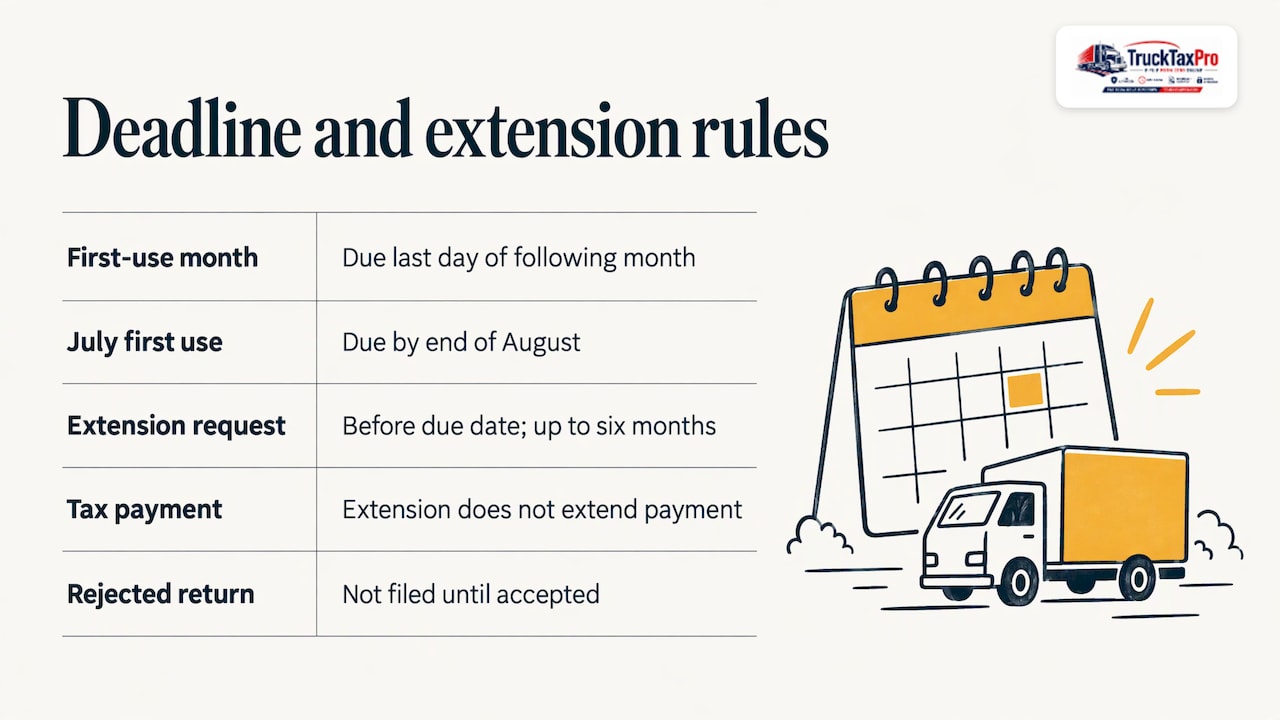
The due date is the last day of the month following the month of first use. A vehicle first used in July is due by the end of August, and so on through the tax period, regardless of your state registration date. Because a rejected return is not a filing, a rejection on the last day leaves you late until you fix and get it accepted. That is the reason to file a few days early: it leaves room for one correction round.
If you cannot file on time, the instructions allow you to request an extension by writing to the IRS at 7940 Kentucky Drive, Florence, KY 41042-2915, before the due date, for no more than six months (taxpayers abroad are the exception). An extension to file does not extend the time to pay the 2290 excise tax. For questions about your return, the IRS Form 2290 line is 866-699-4096, Monday to Friday, 8 a.m. to 6 p.m. Eastern.
E-filing is mandatory if you report 25 or more taxed vehicles, per the IRS e-file page. Fleets in that range cannot fall back on paper when a return stalls, so a clean first transmission matters more for them.
For fleets and preparers: stop stuck returns before they start
On a 40-truck return, one bad VIN can hold up everything. These habits cut the odds:
- Keep a master sheet with each VIN, weight category, first-use month and whether it is taxable, suspended or an agricultural vehicle.
- Store each client's or entity's EIN and legal name exactly as printed on the IRS letter.
- Split vehicles by first-use month so each return carries the right due date.
- Check each VIN for 17 characters and no I, O or Q before you submit.
- Confirm an EIN is more than four weeks old before the first filing.
Preparers managing several clients face the same problem multiplied. Keeping one record per client and one return per client and period keeps duplicates from appearing.
What we do for a return that will not go through
TruckTaxPro is an IRS-authorized e-file platform for Form 2290. You enter business and vehicle details, and the platform handles the tax calculation and IRS validation, so many of the errors above surface before you transmit rather than after. Status is tracked live, and your stamped Schedule 1 is delivered in minutes once the IRS accepts. Our acceptance rate is 99.6%, and our AI chat assistant is there for HVUT and 2290 questions.
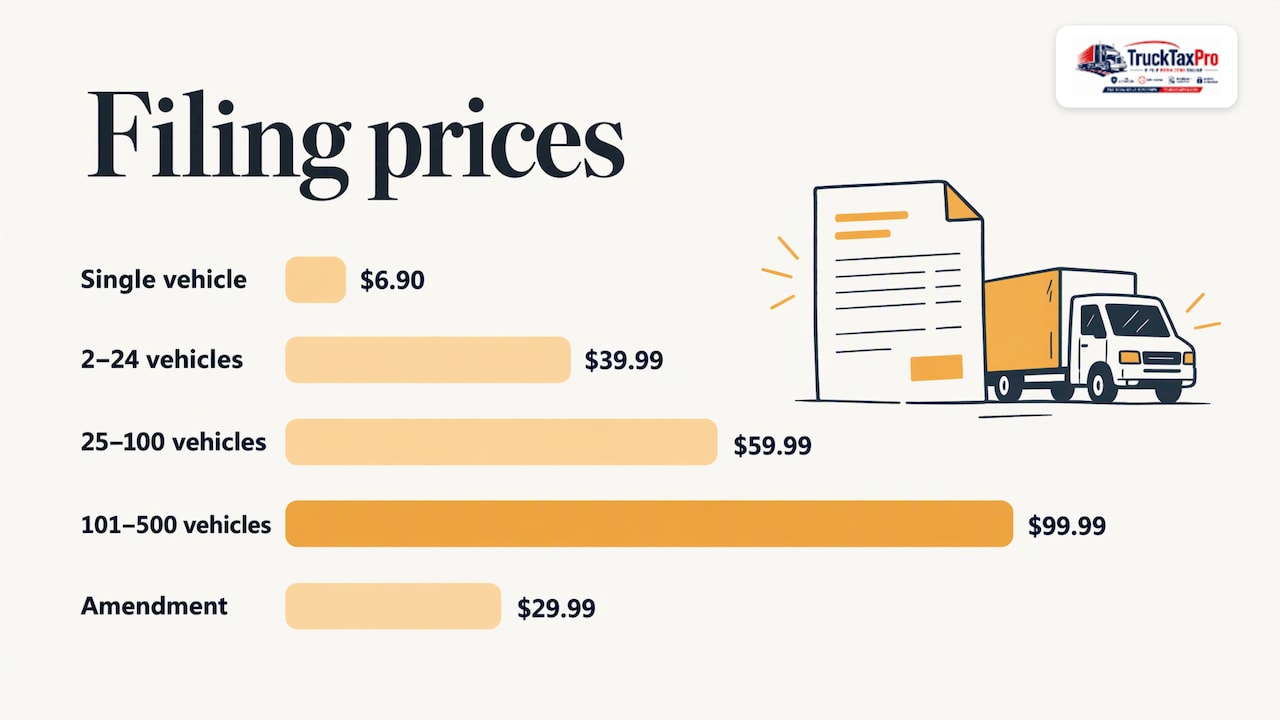
Pricing is per filing and published:
| Filing | Price |
|---|---|
| Single vehicle | $6.90 |
| 2 to 24 vehicles | $39.99 |
| 25 to 100 vehicles | $59.99 |
| 101 to 500 vehicles | $99.99 |
| Amendment | $29.99 |
If your return is rejected, correct the flagged field and file your Form 2290 online. Our 2290 e-filing guide explains the rules, steps and costs for the current period.

Our view: a rejected return is a data problem, not bad luck
We look at stuck returns as a data problem that can be caught early. The IRS e-file system compares what you enter against its own records, and when the two disagree, the return stops. The disagreement is almost always small: a name, a digit, a month.
That is why we built TruckTaxPro around validating details as you enter them, delivering the stamped Schedule 1 in minutes and showing live IRS status. A trucker should not have to guess whether a filing went through, because a truck without a Schedule 1 is a truck that cannot be registered.
It is also why we keep the price of a single-vehicle filing at $6.90 and make VIN corrections free for filings made with us. The cost of getting the 2290 excise tax filing right should never be the reason someone files late or skips a correction.
the author
FAQ
How long should I wait before I worry that my 2290 is stuck?
E-filed returns get an IRS acknowledgement in near real time, so a return with no accepted or rejected status after a short wait probably was not transmitted. Open your account and finish the submission. For a mailed return, the first step is checking that it was signed.
Is a rejected Form 2290 the same as a late filing?
A rejected e-file return is not a filing, so if you are rejected near the deadline and do not get an accepted return in time, the return is late. Correct the flagged problem and resubmit as soon as possible. Filing a few days before the due date leaves room for that.
Can I fix a wrong VIN without paying 2290 excise tax again?
Yes. A VIN correction changes the identifier, not the tax, so it does not create additional tax. The IRS allows VIN, weight and mileage corrections to be e-filed. Start with our free VIN correction for TruckTaxPro filers.
Why was my return rejected when my EIN is correct?
The usual reason is that the business name does not match the name the IRS holds for that EIN. A brand-new EIN can also be rejected for up to about four weeks while it is established in IRS systems. Compare your return to the IRS letter that assigned the EIN.
Do I need to do anything else once I have the stamped Schedule 1?
Save a copy and keep it with the vehicle's records. Your state uses it as proof that the 2290 excise tax was filed when you register or renew the vehicle.
Sources
- IRS Instructions for Form 2290 (07/2026)
- IRS: E-file Form 2290
- IRS: FAQs for truckers who e-file
- IRS Publication 4900
- IRS: Modernized e-File overview
- IRS: Known issues and solutions