Electronic HVUT filing means sending your Form 2290 and paying the heavy vehicle use tax through an IRS-approved provider, then getting your watermarked Schedule 1 by email. You cannot do it on IRS.gov, and the IRS says the Schedule 1 can be available within minutes of acceptance. At TruckTaxPro, a single-vehicle filing costs $6.90, and the platform handles the tax calculation and IRS validation for you. Below is the full routine, with the places where returns usually go wrong.
TL;DR
- Form 2290 is the annual federal return for the heavy vehicle use tax, due for vehicles with a taxable gross weight of 55,000 pounds or more. The tax period runs July 1 to June 30.
- E-filing is required when a single return reports 25 or more vehicles. Everyone else is encouraged to e-file because it is faster.
- You need an EIN, each vehicle's 17-character VIN and its taxable gross weight, plus a payment method.
- After the IRS accepts the return, the stamped Schedule 1 arrives by email. You use it as proof of payment at your state DMV.
- VIN typos and weight changes are fixed with a VIN correction or an amended return, not a new original filing.
Table of Contents
- What the heavy vehicle use tax is and who owes it
- When you must e-file and when you may
- What you need before you start
- How much tax you owe and when it is due
- The e-file routine, step by step
- Fixing mistakes after you file
- What e-filing costs on TruckTaxPro
- Our view: why a dedicated e-file platform fits trucking
- Ready to file
- FAQ
- Sources
What the heavy vehicle use tax is and who owes it
The 2290 excise tax is a federal annual tax on heavy highway vehicles. According to the IRS instructions for Form 2290, anyone, whether an individual or any kind of organization, who has a highway motor vehicle registered in their name with a taxable gross weight of 55,000 pounds or more must file. The IRS Trucking Tax Center confirms the filing season runs July 1 through June 30, and that tax is prorated for vehicles first used after July.
Taxable gross weight is not just the empty weight on the title. For most trucks the IRS defines it as the sum of three things: the vehicle's unloaded weight fully equipped for service, the unloaded weight of the trailers or semitrailers customarily used with it, and the maximum load customarily carried. If your state requires you to declare a specific gross weight, the taxable weight must be at least the highest figure you declared. The weight category you land in sets your tax, so this is the number to get right.
Low-mileage vehicles still need a return
A truck you expect to use 5,000 miles or fewer on public highways in the period (7,500 for farm vehicles) is tax-suspended, but you still file. IRS Tax Tip 2026-62 says the full tax becomes due if the vehicle goes over the mileage limit during the period. Suspended vehicles are reported as category W, and they do not count toward the 25-vehicle threshold.
When you must e-file and when you may
The rule is simple. The IRS ETEC programs page says a taxpayer reporting 25 or more vehicles for any taxable period must e-file through an IRS-approved Modernized e-File (MeF) provider, a requirement set by Congress. Fleets above that line have no paper option. Amendments follow the same rule: under IRS Publication 4163, if you had to e-file the original, amended and superseding returns must be e-filed too unless the IRS grants a waiver.
Below 25 vehicles, e-filing is optional but encouraged. Paper filers wait for a stamped Schedule 1 by mail, while e-filed returns get Schedule 1 electronically from the provider. If your DMV renewal is close, that difference matters.
One more change worth knowing: per Publication 4164, the IRS no longer accepts Form 2290 returns for tax periods ending before July 1, 2022. For a current filing, the period that matters is July 1, 2026 to June 30, 2027.
What you need before you start
Gather these before you open any filing screen. Most rejected returns trace back to this list.
- An EIN. The IRS e-file page says a Social Security number cannot be used. If you do not have an EIN yet, apply and allow four weeks for it to be established in IRS systems before filing.
- A business name that matches the EIN exactly. The name control on the return must match the name the IRS has for that EIN.
- Each vehicle's VIN. Publication 4900 says the complete VIN is required, and a VIN shorter than 17 digits must be padded with leading zeros to reach 17.
- Each vehicle's taxable gross weight, so it falls in the right category.
- The month each vehicle was first used on public highways. This sets your due date and, for vehicles first used after July, the prorated tax.
- A payment method.
If you file for clients as a tax preparer, add three checks per client: the EIN is active and name-matched, each VIN is verified character by character, and any prior-year credits or suspended vehicles are flagged. A paid preparer also signs with their own PTIN, as the IRS instructions require. It also helps to make sure the registration details you hold match the carrier's records, and these FMCSA and state records checks show how quick that comparison is.
How much tax you owe and when it is due
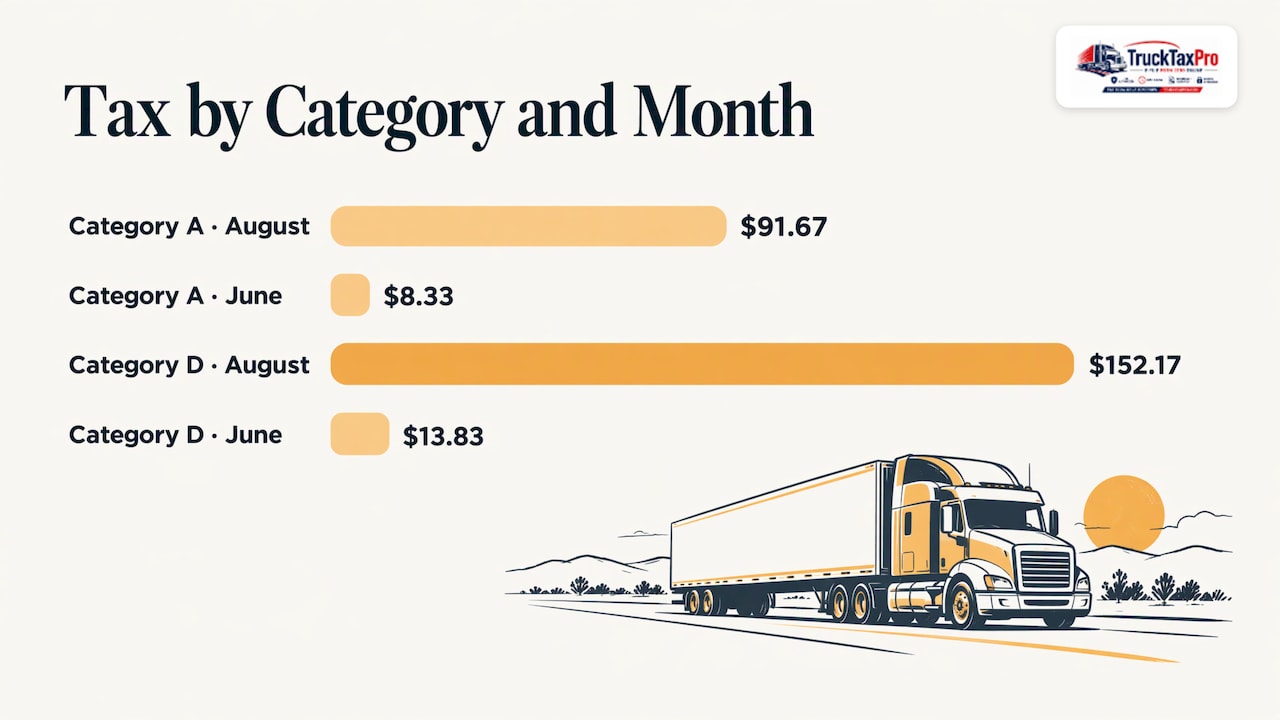
The 2290 excise tax depends on weight category and the month of first use. The IRS instructions list a full annual amount for vehicles used in July and partial-period amounts for later months. For example, category A (55,000 to 75,000 pounds) is $91.67 for first use in August and falls to $8.33 for June. Category D is $152.17 for August and $13.83 for June. Multiply by the number of vehicles in each category and add them up. Check the current tables in the Form 2290 instructions, since the IRS publishes them for each period.
The due date is the last day of the month after the month of first use. A truck first used in July is due by the end of August, and the same logic applies to any other month. If that day lands on a weekend or legal holiday, the deadline moves to the next business day. The date is not tied to your state registration renewal, so a truck can be due before you ever visit the DMV.
The e-file routine, step by step
Here is the sequence with the spots where it tends to go wrong.
1. Choose an IRS-approved provider
The IRS says you cannot e-file Form 2290 on IRS.gov. You use participating commercial software. TruckTaxPro is an IRS-authorized e-filing platform built only for Form 2290 work: original filings, amendments, VIN corrections and fleet management.
2. Enter business details and vehicles
Enter your EIN, business name and address, then add each vehicle with its VIN, weight category and first-use month. This is where mismatches creep in: a name that differs from the EIN record, or a VIN with one wrong character. On our platform you enter the business and vehicle information once, and the platform manages the tax calculation and IRS validation, so you are not working through the rate tables by hand.
3. Review, sign and transmit
The software walks you through the prompts to complete, sign and e-file the return. Read the VIN list one final time before you send it. A corrected VIN later is easy on our platform, but it is faster to get it right the first time.
4. Pay the tax
The tax has to be paid in full with the return. The IRS instructions list four ways to pay: electronic funds withdrawal (direct debit) authorized during e-filing, EFTPS, a credit or debit card, or a check or money order with the payment voucher for paper returns. If you use EFTPS, enroll first (the IRS says to allow 5 to 7 business days), and submit the payment by 8:00 p.m. Eastern time the day before the due date. Direct debit inside the e-file flow avoids that enrollment lead time.
5. Receive and print your Schedule 1
Once the IRS accepts the return, the watermarked Schedule 1 is emailed to you. We deliver the stamped Schedule 1 in minutes and show live IRS status updates, and we store your documents digitally so you can pull the file again at renewal. When you print it, make sure the watermark is legible before you hand it to the DMV. The IRS suggests reprinting with fresh ink or on another printer if it is faint.
Fixing mistakes after you file
Two different corrections exist, and mixing them up costs time.
- VIN correction. Per Publication 4163, this is a corrected Form 2290 with the VIN Correction box selected, Schedule 1 completed with the right VIN, and an explanation of which VINs changed and why. It changes the identification number only, so there is no additional tax. See our VIN correction page. VIN corrections cost $9.99 each, and TruckTaxPro offers unlimited free VIN corrections for filings made on its platform.
- Amended return. The IRS allows this only for additional tax from an increase in taxable gross weight, or for a suspended vehicle that exceeded the mileage limit, according to Publication 4164. The Amended Return box is checked and the VIN and category columns on Part I Line 1 are left blank, starting entries on Line 2. Our amendment filing covers both cases and costs $29.99.
A vehicle you bought after your original filing belongs on a new return, not an amendment.
What e-filing costs on TruckTaxPro
Our fee is a one-off charge per filing, separate from the tax you owe the IRS:
| Filing | Fee |
|---|---|
| Single vehicle | $6.90 |
| 2 to 24 vehicles | $39.99 |
| 25 to 100 vehicles | $59.99 |
| 101 to 500 vehicles | $99.99 |
| Amendment | $29.99 |
| VIN correction | $9.99 |
For a fleet, the tiers mean the fee is set by the size band, with no per-VIN add-ons. The 25 to 100 tier is the first one where e-filing is mandatory, and it is $59.99 for the whole return.
Our view: why a dedicated e-file platform fits trucking
Most of the trouble in Form 2290 comes from small data errors and from waiting. A wrong VIN character, a name that does not match the EIN, a weight in the wrong category. Each one slows the stamped Schedule 1 that a driver needs to renew registration.
That is why we built TruckTaxPro around one job. You enter your business and vehicle details, the platform calculates the tax and validates the return with the IRS, and you get the stamped Schedule 1 in minutes. Our acceptance rate is 99.6%.
We also think a fee should be easy to predict. A single vehicle is $6.90. Fleets pay one flat fee for their size band. If a VIN needs fixing on a filing you made with us, the correction is free. For owner-operators and fleets alike, that is how a yearly tax chore should work.
the author
Ready to file
If your vehicles are in service and the due date is coming, you can start your return in a few minutes. Start your 2290 e-file with TruckTaxPro, from $6.90 for a single vehicle, with fleet pricing up to 500 vehicles.

Fleet owners and tax preparers can manage multiple vehicles and client filings in one place, with live IRS status and stored documents. The details of fees and fleet tiers are on our Form 2290 e-filing page.
FAQ
Can I e-file Form 2290 directly on IRS.gov?
No. The IRS says you must use a participating commercial software provider. You complete, sign and transmit the return in that software, and the provider emails your Schedule 1 after acceptance.
How fast do I get my Schedule 1?
The IRS instructions note it can be available within minutes after the IRS accepts the return. It is a watermarked copy sent by your provider, and you can use it as proof of payment for state registration.
What if I entered the wrong VIN?
File a VIN correction. It changes only the identification number, so no extra tax is due, and it produces a new Schedule 1. If your original filing was made on TruckTaxPro, the correction is free.
Do I have to e-file if I only have a few trucks?
Not if you report fewer than 25 vehicles on the return. The IRS still encourages e-filing, since it is faster and gives you an electronic Schedule 1 instead of waiting for mail.
Sources
- Instructions for Form 2290, IRS
- Trucking Tax Center, IRS
- IRS Tax Tip 2026-62: Form 2290 filing deadlines
- Excise Tax e-File and Compliance programs, IRS
- ETEC frequently asked questions, IRS
- E-file Form 2290, IRS
- Publication 4900, IRS
- Publication 4163, IRS
- Publication 4163 accessible version, IRS
- Publication 4164, IRS