
Managing many clients' Form 2290 returns comes down to one routine: collect the same facts for every vehicle, file one return per first-use month, keep each client's tax payment separate from your filing fee, and store every stamped Schedule 1 where you can find it in seconds. Do that in one e-filing account built for multiple vehicles and clients, and the 2290 excise tax stops being a scramble every summer. TruckTaxPro is an IRS-authorized e-file platform that handles tax calculation, original filings, amendments, VIN corrections and multi-vehicle management in one place, starting at $6.90 for a single vehicle.
TL;DR
- File one Form 2290 for each month in which a client's vehicles were first used, and track each month as its own return.
- E-filing is mandatory for returns covering 25 or more taxed vehicles, and the IRS requires it to go through a participating commercial software provider.
- The provider charges only its own fee. The 2290 excise tax goes to the IRS separately, so keep the two apart on every client invoice.
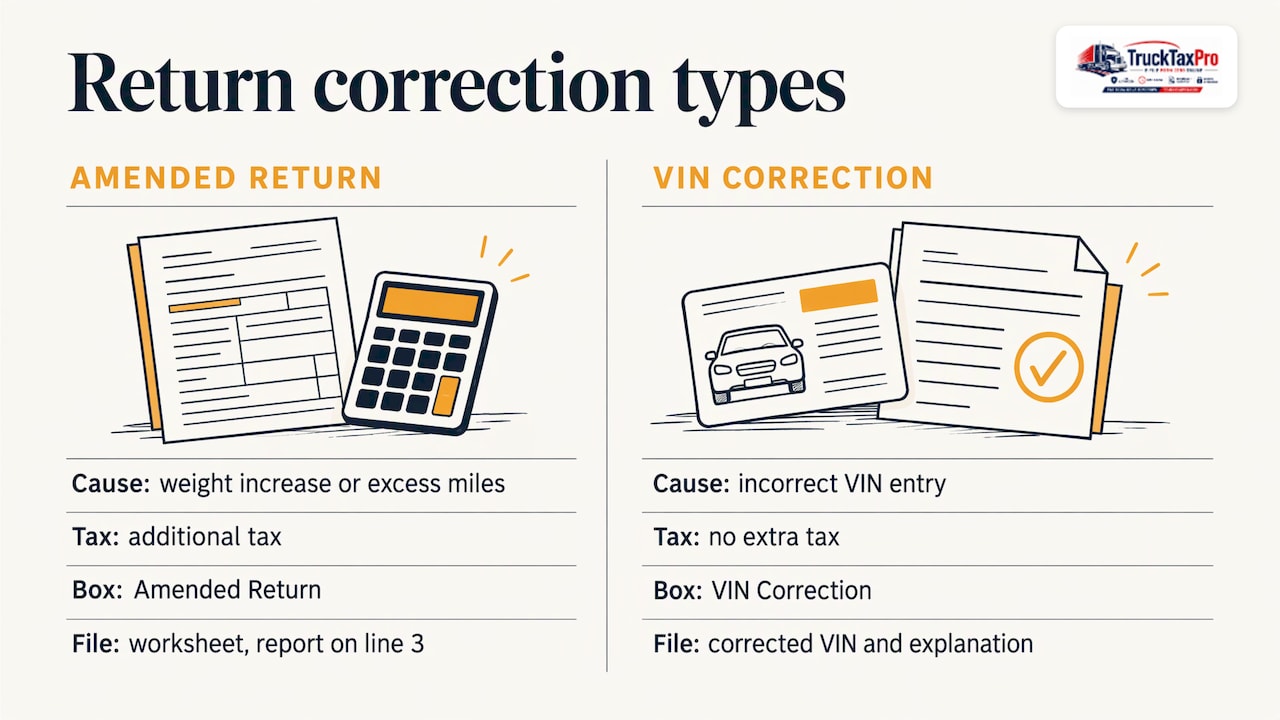
- Amendments are for weight increases and exceeded mileage only. A VIN error is fixed with a VIN correction, not a new return.
- Check each stamped Schedule 1 for a legible watermark before it goes to a client or a DMV.
Table of Contents
- What you are actually managing
- Build a client file before you file anything
- Authorization: 2848 versus 8821
- Know which returns must be e-filed
- Due dates: one return per first-use month
- The routine for each client return
- Amendments and VIN corrections for clients
- When a filing is rejected or a Schedule 1 is late
- A monthly routine that scales to 50 clients
- Why we built our workflow around multi-vehicle filers
- File your clients' returns with TruckTaxPro
- FAQ
- Sources
What you are actually managing
Form 2290 is the return used to figure and pay tax on highway motor vehicles with a taxable gross weight of 55,000 pounds or more. It also covers suspension claims, credits and the reporting of used vehicles acquired. The tax is called the heavy highway vehicle use tax (HVUT), and many truckers simply call it the 2290 excise tax.
The current tax period runs July 1, 2026 through June 30, 2027. You must file if a highway motor vehicle registered, or required to be registered, in your client's name reaches that weight. Filers can be individuals, LLCs, corporations, partnerships or other organizations.
The piece of paper everyone wants is Schedule 1. It lists each vehicle by category and VIN, and once the IRS stamps it, it is the proof of payment states ask for at registration. It also serves for U.S. Customs and Border Protection entry of Canadian or Mexican vehicles. For a preparer, every client return is really a request for one stamped Schedule 1, delivered on time.
Build a client file before you file anything
Most problems with multiple returns start with missing data, not with the tax. Before you open the e-file form, collect the same set for each client:
- Legal business name and EIN, exactly as the IRS has them. The IRS says the name control used on an e-filed return must match the EIN name, and a newly issued EIN needs about four weeks to be established in IRS systems before you can file.
- VIN for every vehicle. Copy it from the title or registration, not from memory or an old invoice. A single wrong character later means a correction.
- Taxable gross weight category for each vehicle. This is the weight that sets the tax, so confirm it from the registration and the vehicle's configuration. Our guide to figuring taxable gross weight walks through it.
- Month of first use. This decides which return the vehicle belongs on and when it is due.
- Use type. Is the vehicle taxed, suspended (expected to run 5,000 miles or fewer, or 7,500 for agricultural vehicles), or being reported as a credit for a destroyed, stolen or sold truck?
- Authorization. Your signed agreement with the client, and the right IRS authorization form if you will deal with the IRS on their behalf (more below).
Keep this in one record per client, not scattered across email threads. If you sort vehicles by first-use month at intake, you will see immediately how many separate returns that client needs.
Which vehicles belong on the return
Not every truck a client owns needs reporting, and some that look light on paper are not. The test is the 55,000-pound taxable gross weight on a vehicle registered in the client's name. State registration fees and paperwork vary and show what documents a client should have on file for each vehicle, which helps when you reconcile the fleet list against what is actually titled. For the threshold itself, see our explainer on 55,000-pound vehicles and Form 2290.
Authorization: 2848 versus 8821
Filing the return is one thing. Speaking to the IRS about it is another, and the two IRS forms are not interchangeable. According to the Internal Revenue Manual, Form 2848 (Power of Attorney and Declaration of Representative) authorizes a representative to act for the taxpayer before the IRS and receive confidential tax information. Form 8821 (Tax Information Authorization) only lets someone receive or inspect that information, with no right to represent.
In practice, decide per client at onboarding which one you need and record it in the file. If you only transmit returns and hand back the Schedule 1, you may need neither. If you expect to answer IRS notices for the client, get the right form signed first.
Know which returns must be e-filed
The IRS requires e-filing for returns covering 25 or more taxed vehicles, not counting category W suspended vehicles. It also states that Form 2290 is filed through a participating commercial software provider, not on IRS.gov. That matters for a preparer: a client with 24 trucks can still choose paper, but a client with 25 cannot, and it is usually simpler to e-file all of them the same way.
The pricing on our platform follows vehicle count per filing:
| Vehicles on the return | Filing fee |
|---|---|
| 1 | $6.90 |
| 2 to 24 | $39.99 |
| 25 to 100 | $59.99 |
| 101 to 500 | $99.99 |
These are our filing fees only. The tax owed to the IRS is separate.
Due dates: one return per first-use month
The IRS instructions say that when vehicles are first used in more than one month, you file a separate Form 2290 for each month. The return is due by the last day of the month after the month of first use. When that day lands on a weekend or holiday, it moves to the next business day. The instructions give examples: July 2026 first use is due by August 31, 2026, and June 2027 first use is due by August 2, 2027.
The big wave comes in July, when the new tax period starts and most existing vehicles need their annual return. But clients who buy a truck in March or put a parked unit back on the road in October create off-cycle returns. Build a calendar that lists each client's vehicles by first-use month, and check it at the start of each month.
An extension of time to file can be requested in writing, for up to six months, but the extension does not extend the time to pay the tax. Treat the payment date as fixed.
The routine for each client return
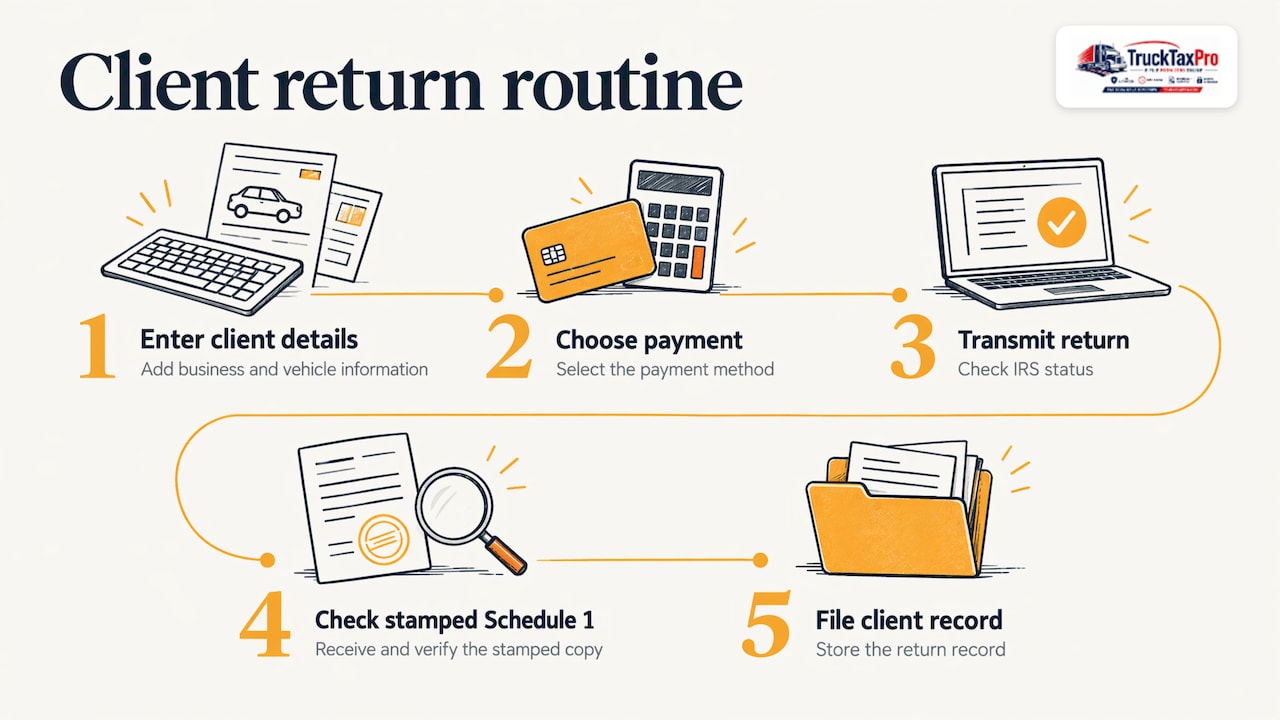
Step 1: Enter business and vehicle details
Enter the client's name and EIN, then the vehicles with VIN, weight category and first-use month. This is where a typo costs the most, so read each VIN back against the registration. On our platform you enter the business and vehicle details and the system manages the tax calculation and IRS validation, which saves you working the rate tables by hand for every truck.
Step 2: Choose how the tax is paid
Per the IRS instructions, you pay in full by electronic funds withdrawal when e-filing, by EFTPS (scheduled by 8:00 p.m. ET the day before the due date), by credit or debit card, or by check or money order with the Form 2290-V voucher. Pick the method with the client before you transmit, and note who authorized the withdrawal.
The IRS also says the e-file provider charges only its own fee, not the tax. On your invoices, show the tax and your preparation fee on separate lines. With ten clients, merged amounts are the fastest route to billing arguments.
Step 3: Transmit and watch the status
Once you submit, the return goes to the IRS for acceptance or rejection. We show live IRS status updates for each filing, so you do not need to guess which of your clients is still waiting.
Step 4: Receive and check the stamped Schedule 1
For e-filed returns, the watermarked Schedule 1 is sent electronically within minutes of IRS acceptance to the provider, through the account or by email. Our platform delivers it instantly after acceptance and stores the documents digitally, so a client who loses their copy in November can get it again without a new filing.
Before passing it on, look at the printout. The IRS advises making sure the watermark is legible and, if it is faint, reprinting with fresh ink or another printer before it goes to a state DMV. Our walkthrough on how to get your stamped Schedule 1 covers the common snags.
Step 5: File the record
Save the stamped Schedule 1 in the client's folder with the filing date, the vehicle list and the payment confirmation. Name files consistently, for example client, tax period, first-use month. When a state registration office asks for proof eight months later, you will find it in seconds.
Amendments and VIN corrections for clients
The two most common mid-year changes get mixed up, so keep them straight.
Amended return. Per the IRS instructions, check the Amended Return box only for additional tax caused by a taxable gross weight increase, or by a suspended vehicle going over its mileage limit. Figure the additional tax with the Partial-Period Tax Tables worksheet, report it on line 3, and file by the last day of the month following the month the weight increased. Our amendment filing covers weight increases and exceeded mileage and costs $29.99 per filing.
VIN correction. When a VIN was entered wrongly, no extra tax is involved. You check the VIN Correction box, list the corrected VIN on Schedule 1 for the tax period being corrected, and attach an explanation. IRS Publication 4163 confirms that for e-filed forms a VIN correction is treated like an amended return, with the corrected VIN and an explanation statement identifying which VINs changed and why. On TruckTaxPro, VIN corrections are free and unlimited for filings made on our platform, so a transcription slip on one client's truck does not become a cost line.
Do not file an amendment for a VIN typo, and do not file a VIN correction when the weight went up. Record the reason in the client file either way.
When a filing is rejected or a Schedule 1 is late
A rejection usually points to a data mismatch: the name control not matching the EIN, a very new EIN, or a VIN that fails validation. Fix the field, resubmit, and note the cause in the client file so you catch it earlier next time. The IRS gives four weeks for a new EIN to appear in its systems, so a brand-new client company may need a wait before the return will be accepted.
For returns that were filed on paper, the IRS's internal procedures say that when Form 2290 arrives with missing VINs or no Schedule 1, it edits the return and may prepare a substitute Schedule 1 rather than returning it. That route is slow and unpredictable, another reason preparers favor e-filing, where acceptance and the stamped copy come back in minutes.
If a client's return is accepted and the Schedule 1 still has not appeared, look first in the provider account and the spam folder. Our AI chat assistant answers HVUT and 2290 questions if you need a quick check on a rule.
A monthly routine that scales to 50 clients
A preparer who handles a few dozen clients can run the whole practice on a short cycle:
- Start of month: list vehicles with a first-use date in the prior month and confirm which clients need a return.
- Mid-month: collect missing VINs, weights and authorizations. Chase early, because due dates fall at the end of the following month.
- Filing week: transmit returns grouped by client, confirm payment method for each, and send invoices that separate tax from fee.
- After acceptance: check each Schedule 1 for legibility, send it to the client and file a copy.
- Quarterly: compare your client fleet lists against new registrations and sales to catch vehicles that crossed the 55,000-pound line or changed hands.
For the wider rules, our pages on 2290 filing requirements and IRS 2290 e-filing cover who must file and what the process costs.
Why we built our workflow around multi-vehicle filers
Preparers do not lose clients over the tax. They lose them over a missing Schedule 1, a mistyped VIN or an invoice nobody can read. We built TruckTaxPro as an e-file platform for owner-operators, fleets and tax preparers, so the work that repeats for every client, calculation, IRS validation, status tracking and document storage, is handled in one place.
Our pricing is flat and published: $6.90 for a single vehicle, with fleet tiers by vehicle count and no hidden per-VIN charges. A VIN correction for a filing made on our platform is free and unlimited, because a typo should not turn into a bill.
When you manage the 2290 excise tax for many clients, speed and a clean paper trail matter more than anything else. Stamped Schedule 1 in minutes, kept in your account, is what we aim to give every filer.
the author
File your clients' returns with TruckTaxPro
If you handle 2290 filings for owner-operators or fleets, our platform takes each return from vehicle entry to stamped Schedule 1. Filing starts at $6.90 for one vehicle and runs $39.99 for 2 to 24 vehicles, $59.99 for 25 to 100 and $99.99 for 101 to 500. Our 99.6% acceptance rate, instant Schedule 1 delivery and digital document storage keep each client's record in one account.

Start a Form 2290 e-file on TruckTaxPro and add your first client's vehicles today.
FAQ
Do I need a separate Form 2290 for each client?
Yes. Each taxpayer, identified by its own name and EIN, files its own return. Within one client, you also file a separate return for each month in which vehicles were first used.
What is the difference between amending a 2290 and correcting a VIN?
An amendment reports additional tax from a taxable gross weight increase or a suspended vehicle exceeding its mileage limit. A VIN correction fixes an incorrect VIN with no new tax. Both are filed as corrected returns with the matching box checked.
Does my filing fee include the tax owed to the IRS?
No. The IRS says the e-file provider charges only its own fee, not the tax. The tax is paid separately, for example by electronic funds withdrawal, EFTPS or card, so show them as two lines on a client invoice.
How quickly does the stamped Schedule 1 arrive?
For e-filed returns, the IRS-stamped Schedule 1 typically arrives within minutes of acceptance. With us it is delivered instantly after acceptance and stored in your account. Check that the watermark is legible before you print it for a DMV.
Sources
- About Form 2290, Heavy Highway Vehicle Use Tax Return (IRS)
- Instructions for Form 2290 (IRS)
- Instructions for Form 2290, PDF (IRS)
- E-file Form 2290 (IRS)
- Publication 6060 (IRS)
- Publication 4163 (IRS)
- IRM 1.25.1 Rules Governing Practice Before the IRS
- IRM 3.11.23 Excise Tax Returns