
A Form 2290 that shows "accepted" and a payment that has not moved are two separate events. Acceptance means the IRS took the return for processing. It does not mean your bank was debited or your card was charged. The fix is to check the payment on its own track, confirm which method you chose, and move to another method quickly if the money never left. If you want the return and the Schedule 1 side handled in one place, we built our platform for exactly that: e-file your Form 2290 with TruckTaxPro, from $6.90 for a single vehicle.
This guide is for owner-operators, fleets, and tax preparers who e-filed the 2290 excise tax return and cannot see the payment landing.
TL;DR
- Acceptance and payment are separate. A stamped Schedule 1 does not prove a debit cleared.
- Check the bank statement, then the payment method's own history (EFTPS, card processor), then your IRS Online Account.
- Electronic withdrawals can take about 7 to 10 business days to show up, so a missing debit on day two is not yet a problem.
- If the payment truly failed, use another payment method right away. The correction window for the return does not cover payment records.
- Call the IRS Form 2290 Call Site at 866-699-4096 for account help, Monday to Friday, 8 a.m. to 6 p.m. Eastern.
Table of Contents
- Accepted is not the same as paid
- The four ways to pay, and where each one shows up
- How long should you wait before worrying?
- Step-by-step: find out what happened to the payment
- What to do if the payment really did not go through
- Near or past the deadline: what is at stake
- If you cannot get Schedule 1 stamped until the tax is paid
- Mistakes that cause "payment not processed" in the first place
- Do you have to e-file? Why the return side matters too
- Perspective
- Filing with us
- FAQ
- Sources
Accepted is not the same as paid
When you e-file Form 2290, the IRS runs two things. One is the return: the vehicle data, the weight categories, the tax computed. The other is the money. The IRS explains that acceptance of an e-filed return and processing of a payment are separate, so acceptance alone does not confirm that a scheduled withdrawal succeeded.
The watermarked Schedule 1 works the same way. The IRS says an accepted e-filed return can produce a watermarked Schedule 1 almost immediately. That tells you the return was accepted. You need it for registration, but it is a document timeline, not a bank record.
So "payment not processed" usually means one of these:
- The withdrawal or card charge has not reached its posting stage yet.
- The payment record had missing or wrong bank details.
- A separate payment step, such as an EFTPS payment, was never completed.
- The payment was attempted and rejected by the bank or card issuer.
The four ways to pay, and where each one shows up
The July 2026 Form 2290 instructions list four ways to pay the tax in full: electronic funds withdrawal (EFW) with your e-filed return, the Electronic Federal Tax Payment System (EFTPS), a credit or debit card, or a check or money order with Form 2290-V. Where you look depends on which one you used.
| Payment method | What it is | Where to verify |
|---|---|---|
| Electronic funds withdrawal (EFW) | A direct debit from your bank account, requested as part of the e-file | Your bank statement, then IRS Online Account |
| EFTPS | The Treasury's own payment system, scheduled separately from the return | EFTPS payment history and confirmation number |
| Credit or debit card | Paid through an IRS-approved card processor | The processor's confirmation, then IRS Online Account after processing time |
| Check or money order | Mailed with Form 2290-V | Your bank (did it clear?), then the IRS |
The instructions' guidance is to compare the return's acceptance status separately from the payment status. Do not read one as the other.
How long should you wait before worrying?
There is no single processing time that applies to every method. For electronic withdrawals, the IRS tells filers to wait 7 to 10 days after the return was accepted before calling e-file Payment Services. The IRS's Publication 4163 also notes that EFTPS can take 7 to 10 business days from transmission to make EFW information accessible, per the instructions' summary.
A practical rule:
- Days 1 to 3 after acceptance: nothing to do except confirm the scheduled date you picked and make sure the account has the funds.
- Days 4 to 10 (business days): check your bank statement for the debit and your IRS Online Account for a pending or scheduled payment.
- After 10 business days with no debit: treat it as a failed payment and start the recovery steps below.
If you picked a future withdrawal date, the debit will not occur before that date. Many filers forget this and read a future-dated payment as "missing."
Step-by-step: find out what happened to the payment
1. Confirm which method you chose
Open your filing confirmation and find the payment section. Fleet filers and preparers who handle many returns should match each return to its payment method, because one return may have been paid by EFW while another was paid by card.
2. Check your bank statement
For an EFW, look on or after the scheduled date. The IRS instructions point to the bank statement as the first place to check. Look for a Treasury or IRS debit for the exact tax amount. If your bank flagged an unknown ACH debit and blocked it, that would also explain a missing payment. Ask the bank whether any debit was attempted and rejected.
3. Check the payment method's own record
For EFTPS, use its payment history and your confirmation number. For card payments, the IRS advises using the payment processor's confirmation and then reviewing your IRS Online Account after the processing time for that method. That confirmation supports checking the transaction, but it is not proof that the return was accepted, so keep both records.
4. Look at IRS Online Account
The instructions point to IRS Online Account for pending or scheduled payments. A payment can sit as pending before it posts. If it shows as scheduled, there is nothing to fix. If nothing appears after the expected window, move on.
5. Check the bank details you entered
This is the most common avoidable cause. Publication 4163 says an EFW payment record needs the routing number, account number, account type, amount, requested date, and a daytime phone number. If any of that is incomplete, other payment arrangements must be made. A single transposed digit in an account number is enough to stop a debit.
What to do if the payment really did not go through
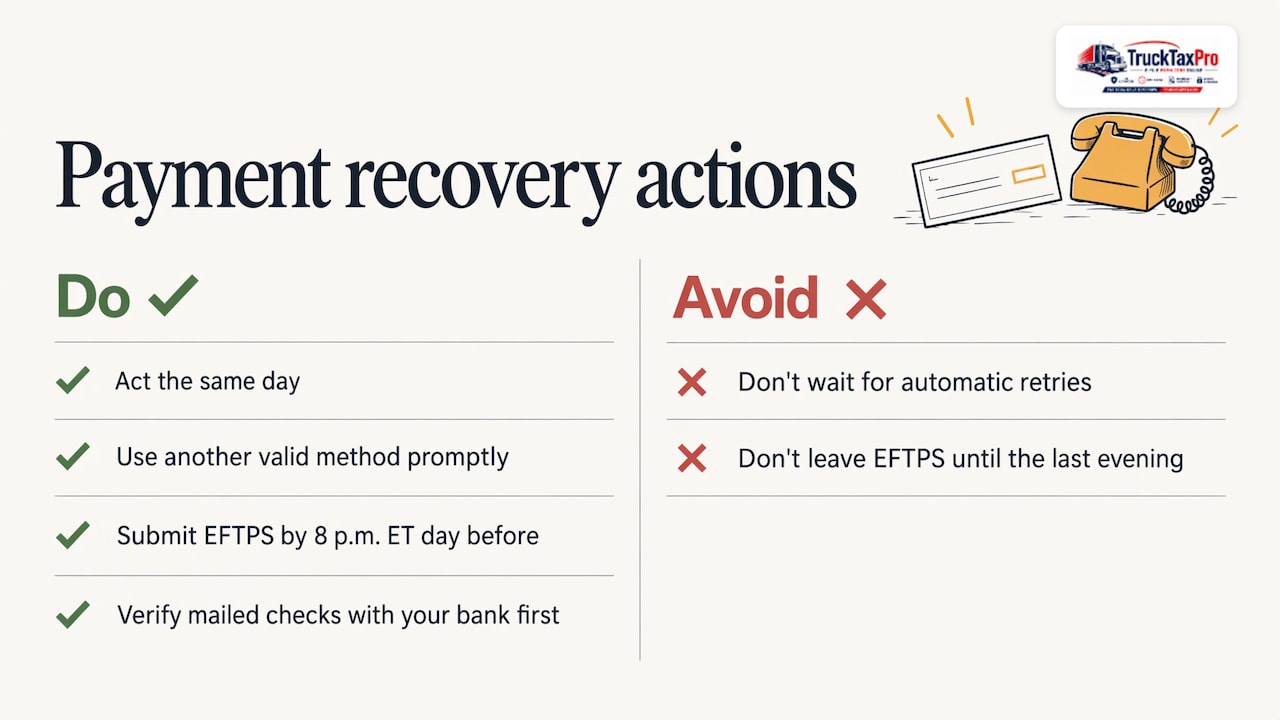
If the debit never happened and the window has passed, act the same day. Do not wait for the system to retry on its own.
Pay by another method. The instructions say to use another valid payment method promptly if an electronic withdrawal did not occur. Publication 4163 adds an important warning: an EFW payment is not covered by the 10-day period that protects a rejected return, so you cannot correct a payment record the way you fix a return. When a return is rejected on the due date, the publication recommends another payment option rather than sending the EFW with that return.
Use EFTPS carefully. Under the July 2026 instructions, EFTPS payments must be submitted by 8:00 p.m. Eastern Time the day before the due date to count as timely. EFTPS also needs you to be enrolled, so do not leave it to the last evening.
If you mailed a check. The IRS says to verify with your bank first. If at least two weeks have passed and it has not cleared, check your online account or call 800-829-1040 to ask whether it was credited. If it was not credited, you may stop payment and pay again. The IRS says it will not charge a dishonored-check penalty in that circumstance, and bank-charge reimbursement may be available.
Call the right line. For Form 2290 account information, call the IRS Form 2290 Call Site at 866-699-4096 (Monday to Friday, 8 a.m. to 6 p.m. Eastern, per the July 2026 instructions). For EFW questions or cancellations, e-file Payment Services is at 888-353-4537, but wait the 7 to 10 days after acceptance first. Have your EIN, the tax period, and your filing confirmation in front of you.
Near or past the deadline: what is at stake
The 2290 excise tax is due for each tax period running July 1 to June 30, and the instructions state that the return must be filed and the tax paid by the applicable deadline. A payment that never posted is, in the IRS's eyes, a payment not made.
Two points matter most:
- File and pay as separate jobs. An accepted return with no payment can still leave you with late-payment exposure. Fixing the payment fast limits it.
- Penalty relief exists. If you are penalized for late filing or late payment and you have reasonable cause, the instructions say you may request penalty relief through the IRS's stated channels. A documented bank rejection or a record of a failed attempt is the kind of detail to keep.
Keep screenshots of the confirmation, the bank statement lines, and the date you re-paid. They shorten any later conversation with the IRS.
If you cannot get Schedule 1 stamped until the tax is paid
Most filers need the stamped Schedule 1 for state registration, such as IRP plates or a base-state renewal. A return can be accepted and yield a watermarked Schedule 1 quickly, as the IRS notes. If your payment problem is separate from acceptance, you can usually hold the Schedule 1 while you fix the payment. Save it somewhere you can retrieve it, and re-download from your filing account if you lose it. Our platform stores your documents digitally, so a Schedule 1 from last season is not buried in an inbox.
Mistakes that cause "payment not processed" in the first place
- Wrong account type. Checking selected when the account is savings, or the reverse.
- Business account with debit blocks. Many business accounts reject unknown ACH debits unless the IRS is on an approved list.
- Insufficient funds on the withdrawal date. The debit is not retried the way a utility bill might be.
- Future-dated withdrawal misread as missing. Check the date you chose.
- EFTPS scheduled but never confirmed. Payment must be submitted by 8:00 p.m. ET the day before the due date.
- Fleet filings with several returns. Amounts get mixed up when one bank transfer is meant to cover multiple returns. Pay each return's exact amount.
Do you have to e-file? Why the return side matters too
The IRS requires e-filing when you report and pay tax on 25 or more taxed vehicles, and encourages it for everyone else because Schedule 1 comes back quickly. Whether you run one truck or a fleet, a clean return makes payment issues easier to isolate. If the return was accepted, you know the problem is limited to the payment. If you spot a wrong VIN afterward, that is a return correction, not a payment issue, and it does not change the tax owed.
Perspective
Most of the panicked messages we hear about a 2290 follow the same pattern: the return shows accepted, a Schedule 1 arrives, and then someone notices the bank never showed a debit. The instinct is to refile. Resist that. Refiling a return that was accepted does not fix a payment, and the filer is left with two problems.
Our platform is built around keeping the return side clean so the payment question stays small. You enter your business and vehicle details, and the platform manages the tax calculation and IRS validation. Our acceptance rate is 99.6%, and your stamped Schedule 1 arrives in minutes with live IRS status updates, so you always know the return is not the issue.
If a VIN was mistyped, our VIN corrections are free for filings made on our platform, and they do not create additional tax liability. For fleets, pricing is flat by vehicle count: $39.99 for 2 to 24 vehicles, $59.99 for 25 to 100, and $99.99 for 101 to 500, with no hidden per-VIN charges. When the return is predictable and cheap to file, you can spend your attention on the one thing that is actually your job: making sure the money moves on time.
the author
Filing with us
When you e-file with TruckTaxPro, you enter your business details and vehicle information, and the platform handles the tax calculation and IRS validation. Single-vehicle filings are $6.90 per filing. Fleets pay $39.99 for 2 to 24 vehicles, $59.99 for 25 to 100 vehicles, and $99.99 for 101 to 500 vehicles. An amendment for a weight increase or exceeded mileage is $29.99, and a VIN correction is $9.99 per filing. Start on our 2290 e-filing page, or go straight to the amendment page or the VIN correction page if you already have a return on file.

For more on who must file and what to gather first, see our guide to 2290 filing requirements and the walkthrough on how to e-file Form 2290 online.
FAQ
Why hasn't the IRS processed my 2290 payment?
The most likely reasons are that the payment has not reached its posting stage, the bank details were incomplete or wrong, or a separate payment such as EFTPS was never completed. For an electronic withdrawal, the IRS says to allow 7 to 10 days after acceptance before calling about it.
Does an accepted return mean my payment went through?
No. The IRS treats acceptance and payment processing as separate. A watermarked Schedule 1 shows the return was accepted, while the payment must be confirmed on your bank statement, your EFTPS history, your card processor record, or your IRS Online Account.
Who do I call about a missing Form 2290 payment?
Call the IRS Form 2290 Call Site at 866-699-4096, Monday to Friday, 8 a.m. to 6 p.m. Eastern Time. Have your EIN, tax period, and filing confirmation ready. For electronic withdrawal cancellations or errors, e-file Payment Services is at 888-353-4537.
Can I fix a bad bank account number after the return is accepted?
Not the way you fix a return. Publication 4163 says the return's correction window does not apply to EFW payment records. If the withdrawal failed, pay using another valid method promptly instead of waiting.
Will I be penalized if my payment fails?
The tax must be paid by the deadline, so a failed payment can lead to late-payment charges. If that happens and you have reasonable cause, such as a documented bank rejection, you may request penalty relief through the IRS's stated channels.
Sources
- IRS: Instructions for Form 2290 (07/2026)
- IRS: E-file Form 2290
- IRS: Free File Fillable Forms payment help
- IRS: Publication 4163 (Rev. 12-2025)
- IRS: Pay taxes by electronic funds withdrawal
- IRS: General procedural questions 2